R for Data Science Exercises
Our task was to complete the exercises from chapters 5 and 7 of the brilliant R for Data Science textbook.
Chapter 5
These exercises were for practising handling data that is not "tidy" - data that doesn't follow these rules.
- Each variable is a column; each column is a variable.
- Each observation is a row; each row is an observation.
- Each value is a cell; each cell is a single value.
Our task was to calculate tuberculosis rates from tables of "untidy" data, without making it tidy first.
table2 has a column for the value "cases" or "population" - this is "untidy" because these values could be column names.
table2 <- tribble(
  ~country, ~year, ~type, ~count,
  "Afghanistan", 1999, "cases", 745,
  "Afghanistan", 1999, "population", 19987071,
  "Afghanistan", 2000, "cases", 2666,
  "Afghanistan", 2000, "population", 20595360,
  "Brazil", 1999, "cases", 37737,
  "Brazil", 1999, "population", 172006362,
  "Brazil", 2000, "cases", 80488,
  "Brazil", 2000, "population", 174504898,
  "China", 1999, "cases", 212258,
  "China", 1999, "population", 1272915272,
  "China", 2000, "cases", 213766,
  "China", 2000, "population", 1280428583
)
First I extracted the values for "cases" and "population" into vectors.
table2_cases <- table2 |>
  filter(type == "cases") |>
  select(count) |>
  pull(count)

table2_population <- table2 |>
  filter(type == "population") |>
  select(count) |>
  pull(count)
I used these new vectors to create a vector for "rate" - the number of tuberculosis cases for every 10,000 people.
table2_rate <- table2_cases / table2_population * 10000
I looped backwards through table2 adding rows for "rate".
for(i in seq(nrow(table2), 1, by = -2)) {
  table2 <- add_row(table2, country = table2$country[i], year = table2$year[i], type = "rate", count = table2_rate[i/2], .after = i)
}
I used formatC to format the "count" column - format="f" removes scientific format, and drop0trailing = TRUE drops zeros after the decimal point.
table2$count <- formatC(table2$count, format= "f", drop0trailing = TRUE)
Here's the resulting table2.
| country | year | type | count | |
|---|---|---|---|---|
| 1 | Afghanistan | 1999 | cases | 745 |
| 2 | Afghanistan | 1999 | population | 19987071 |
| 3 | Afghanistan | 1999 | rate | 0.3727 |
| 4 | Afghanistan | 2000 | cases | 2666 |
| 5 | Afghanistan | 2000 | population | 20595360 |
| 6 | Afghanistan | 2000 | rate | 1.2945 |
| 7 | Brazil | 1999 | cases | 37737 |
| 8 | Brazil | 1999 | population | 172006362 |
| 9 | Brazil | 1999 | rate | 2.1939 |
| 10 | Brazil | 2000 | cases | 80488 |
| 11 | Brazil | 2000 | population | 174504898 |
| 12 | Brazil | 2000 | rate | 4.6124 |
| 13 | China | 1999 | cases | 212258 |
| 14 | China | 1999 | population | 1272915272 |
| 15 | China | 1999 | rate | 1.6675 |
| 16 | China | 2000 | cases | 213766 |
| 17 | China | 2000 | population | 1280428583 |
| 18 | China | 2000 | rate | 1.6695 |
table3 has a column for the values "cases" and "population" together - this is "untidy" because these values could be in separate columns.
table3 <- tribble(
  ~country, ~year, ~rate,
  "Afghanistan", 1999, "745/19987071",
  "Afghanistan", 2000, "2666/20595360",
  "Brazil", 1999, "37737/172006362",
  "Brazil", 2000, "80488/174504898",
  "China", 1999, "212258/1272915272",
  "China", 2000, "213766/1280428583"
)
I split the "rate" column into 2 values - cases and population.
cases_population <- str_split(table3$rate, "/")
I replaced the values in the "rate" column with new calculated values - the number of tuberculosis cases for every 10,000 people.
for(i in 1:nrow(table3)) {
  table3$rate[i] <- as.numeric(cases_population[[i]][1])/as.numeric(cases_population[[i]][2]) * 10000
}
Here's the resulting table3 - note that the rates are the same as in table2.
| country | year | rate |
|---|---|---|
| Afghanistan | 1999 | 0.372740958392553 |
| Afghanistan | 2000 | 1.29446632639585 |
| Brazil | 1999 | 2.19393047799011 |
| Brazil | 2000 | 4.61236337331918 |
| China | 1999 | 1.66749511667419 |
| China | 2000 | 1.6694878795907 |
Chapter 7
These exercises were for practising importing data with read_csv().
The first exercise has 5 read_csv() statements with errors. We had to work out the intention of each statement and correct it.
1. read_csv("a,b\n1,2,3\n4,5,6")
The intention is to read 3 columns and 2 rows, but column 3 doesn't have a name - I corrected it to this.
read_csv("a,b,c\n1,2,3\n4,5,6")
| a | b | c |
|---|---|---|
| 1 | 2 | 3 |
| 4 | 5 | 6 |
2. read_csv("a,b,c\n1,2\n1,2,3,4")
The rows have different numbers of columns - I corrected it to this.
read_csv("a,b,c,d\n1,2,3,4\n1,2,3,4")
| a | b | c | d |
|---|---|---|---|
| 1 | 2 | 3 | 4 |
| 1 | 2 | 3 | 4 |
3. read_csv("a,b\n\"1")
The quotes around the value are not closed, and the rows have different numbers of columns - I corrected it to this.
read_csv("a,b\n\"1\",\"2\"")
| a | b |
|---|---|
| 1 | 2 |
4. read_csv("a,b\n1,2\na,b")
The column names seem to be repeated - I corrected it to this.
read_csv("a,b\n1,2")
| a | b |
|---|---|
| 1 | 2 |
5. read_csv("a;b\n1;3")
The delimeter is a semicolon - I corrected it to this.
read_delim("a;b\n1;3", delim = ";")
| a | b |
|---|---|
| 1 | 3 |
The final exercise was practising referring to "nonsyntactic" column names - the column names are integers.
annoying <- tibble(
  `1` = 1:10,
  `2` = `1` * 2 + rnorm(length(`1`))
)
Extract the variable called "1".
annoying$`1`
[1] 1 2 3 4 5 6 7 8 9 10
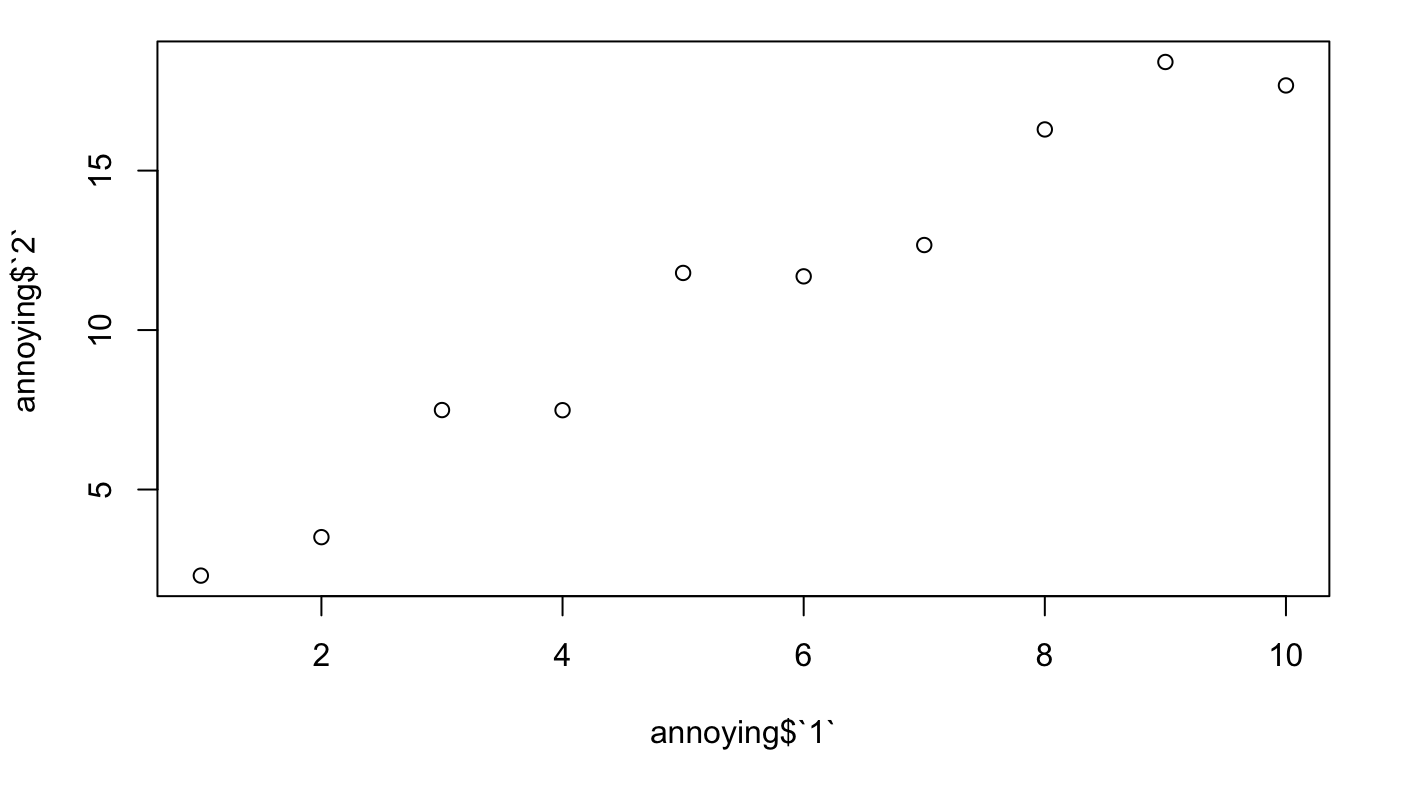
Plot a scatterplot of "1" versus "2".
plot(annoying$`1`, annoying$`2`)
Create a new column called "3", which is "2" divided by "1".
annoying$`3` <- annoying$`1` / annoying$`2`
annoying$`3`
 [1] 0.4346452 0.5703123 0.4004234 0.5342338 0.4240465 0.5135067 0.5526404 0.4910714
 [9] 0.4889729 0.5659152
Rename the columns to "one", "two" and "three".
annoying <- annoying %>%
  rename(one = `1`, two = `2`, three = `3`)
| one | two | three | |
|---|---|---|---|
| 1 | 1 | 2.30072725631471 | 0.43464517458788 |
| 2 | 2 | 3.50685026436756 | 0.570312345617268 |
| 3 | 3 | 7.49206971481884 | 0.400423396230042 |
| 4 | 4 | 7.48735913301889 | 0.534233757047955 |
| 5 | 5 | 11.7911601781261 | 0.424046482658725 |
| 6 | 6 | 11.6843658769525 | 0.513506686044045 |
| 7 | 7 | 12.6664656044915 | 0.552640351189824 |
| 8 | 8 | 16.2909102699325 | 0.491071393031075 |
| 9 | 9 | 18.4059281805146 | 0.488972895674333 |
| 10 | 10 | 17.6704925840338 | 0.565915180487698 |
I thought these were excellent exercises, particularly the ones where we had to think about the intention of incorrect R code before correcting it.
I love using SQL, and R feels like the next logical step for me. These exercises really helped me look more deeply at the subtleties of R functions.